How Relay works
Ask Relay
Ask Relay is a chat with your AI team. During setup it builds your agents and skills with you. Afterwards it's where you ask questions ("Why did you send the Meridian email to a person?") or change things in plain words ("Make Finance more formal").
Feed it your business
Type, paste, or press Attach files to share a company profile, price list, procedure or old emails. Ask Relay reads them and proposes what to set up.
Before a file is shared, Relay shows a preview of what the AI will see, with your private names already replaced. Set your private names first (the setup wizard asks for them).
Cards: nothing changes until you confirm
Every suggestion arrives as a card that shows exactly what will change. You can Confirm, Edit or Reject it.
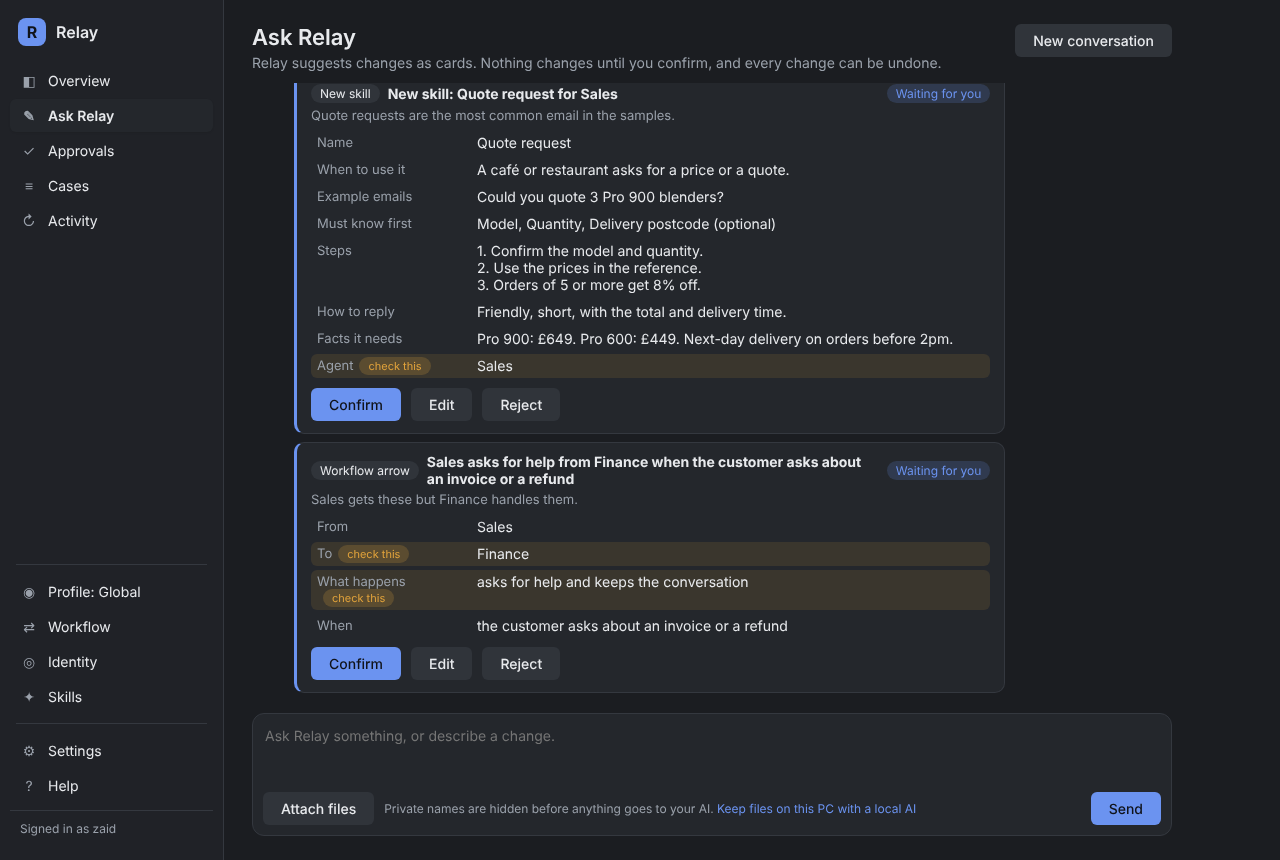
Ask Relay can propose:
- what it understood about your business;
- new agents and what each one handles;
- skills for each agent;
- arrows between agents (who asks whom for help, or hands over);
- lines for Relay's memory, and names to keep private.
Fields that matter most, like which agent a skill belongs to or who an arrow hands work to, are highlighted with check this. At most three cards wait at once. Every confirmed change is recorded and can be undone from its card.
What it can't do
Some settings stay on screens you control, and Ask Relay can't propose them:
- giving a skill more tools than it's allowed;
- changing approval rules or the red lines in Relay's tools;
- removing names from the private list, or turning masking off.
Files and emails you share are treated as information, never as instructions. A document that says "ignore your rules" is just text to Ask Relay.
Good things to ask
- "Here's our price list. Set up a skill for quote requests."
- "Why did the email from Lee go to Needs attention?"
- "Finance should sign off as 'Accounts team'."
- "Add a skill for return requests: 30 days, unused items only."