Tutorials
Tutorial: a weekly report that watches your numbers
Once Relay has built a report for you, it can keep it fresh every week and tell you when something moves far outside normal.
1. Ask for it every week
Reply to the email with your report: "Thanks, can you do this every Monday?" Relay drafts a reply confirming the schedule. Approving it turns the schedule on.
2. Send the new data each week
Email the new week's export to Relay. Relay adds the week to the history it keeps on your PC.
3. Quiet weeks stay quiet
Each Monday Relay refreshes the report. If every number is within its normal range, it doesn't email anyone.
4. When something changes
If a number moves a lot compared with the weeks before, Relay works out the likely cause in code and drafts an alert, for example:
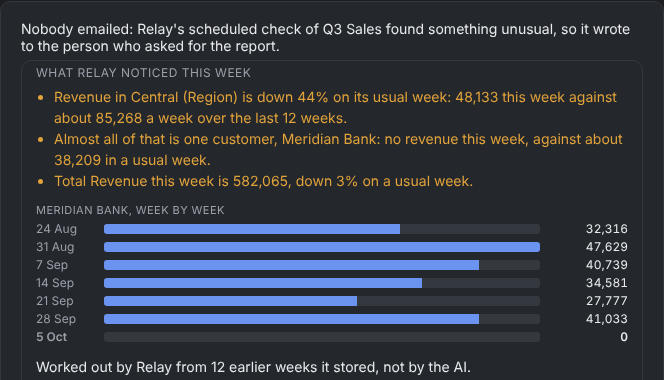
Relay compares each week with at least four earlier weeks and only alerts on big moves in meaningful parts of the business, so small wobbles don't wake you. The alert waits for your approval like everything else; turning it down closes it.
Tips
- Keep the file layout the same each week: same columns, same names.
- Weeks run Monday to Sunday. Files without weekend rows are fine.